Many zones, one file
Each zone keeps its own design basis and design area. Solve one zone, or all of them in one pass.
Firefinch FHC lays out, solves and reports fire sprinkler systems. Every report records the calculation program, the exact engine version and a fingerprint of its inputs, so a reviewer can retrace any number on it.
64-bit Windows 10 or 11 · 30-day trial · Works offline · Metric and imperial
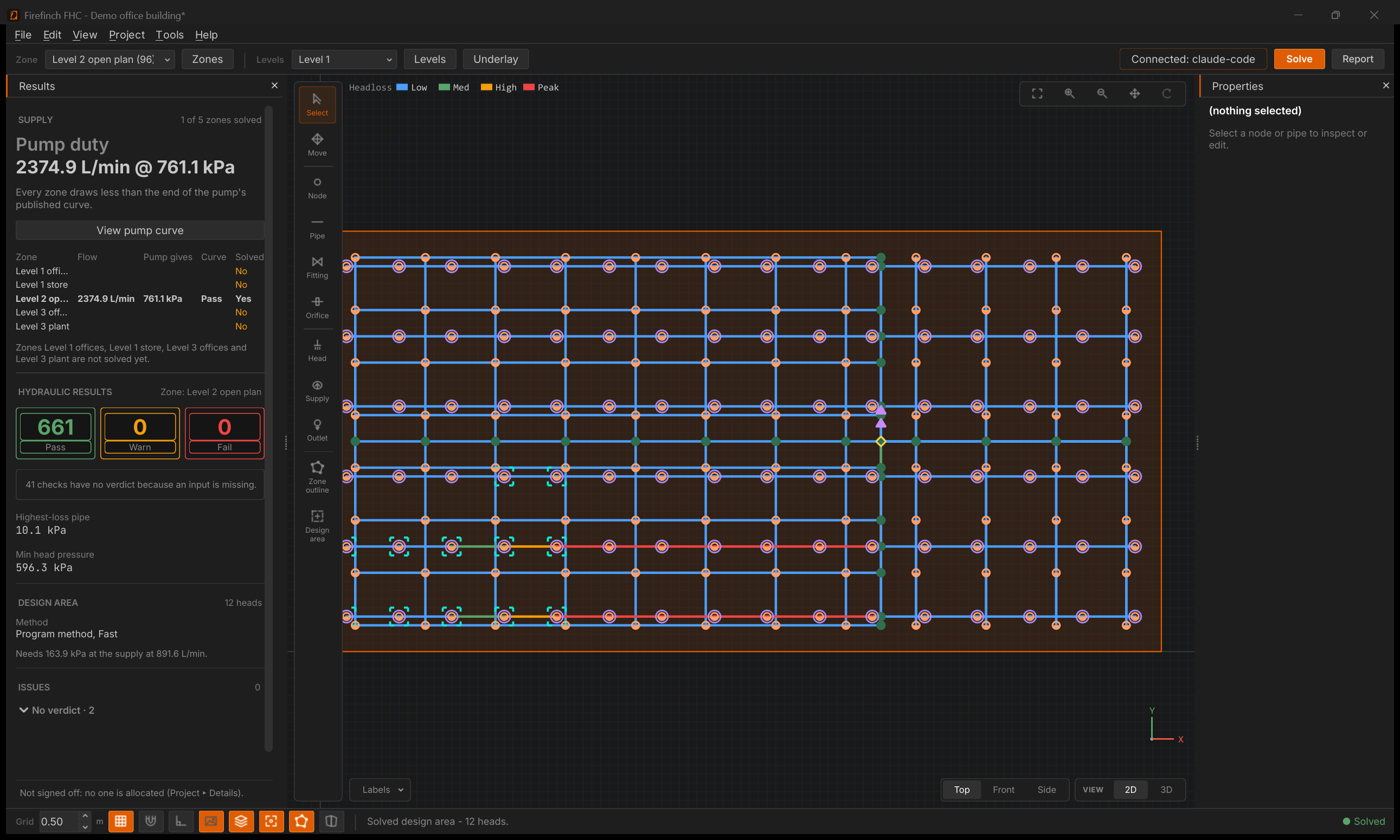
Trace over the architect's drawing, let Firefinch FHC fill each zone with sprinklers, copy the repeats, and let Auto-size propose the pipes. You check and adjust; it does the drafting.
Each zone keeps its own design basis and design area. Solve one zone, or all of them in one pass.
Solve-all checks each zone against the shared pump curve and names the zone that governs flow and the one that governs pressure.
Firefinch FHC finds the most demanding area at Solve. Pick your own and it is compared against the one it found.
Work floor by floor on levels, each with its own drawing, and check the runs in 3D with every floor shown.
Load the architect's drawing as an underlay, set its scale, and draw the network straight over it.
46 pipe types and 472 sizes, each with C-factors for SANS 10287 and for NFPA 13 wet and dry systems. Pick a pipe by the size you order it by, or add types of your own.
Export a report for the authority having jurisdiction, stamped with the program, engine version and a fingerprint of its inputs.
Run solves and exports from scripts, and batch the repetitive parts of a large project.
Firefinch FHC follows the order you already work in. Each step hands the next one something you can check.
Enter the design values and limits from the code your project runs on. Each zone keeps its own design basis, so one project can hold areas of different hazard.
Gives: density, area, duration, limitsTrace over a PDF drawing, fill zone outlines with Lay out sprinklers, and copy the repeats with Array. Work floor by floor on levels and check the runs in 3D.
Gives: a network per zoneSolve finds each zone's most demanding design area and checks every limit you set. Auto-size proposes pipe sizes, and nothing changes until you apply them.
Gives: pressures, flows, verdictsExport a report for the authority having jurisdiction. It records the calculation program, the engine version and a fingerprint of the inputs behind it.
Gives: a report a reviewer can retraceComing: the design criteria wizard, working towards formal support for NFPA 13 (2025), with every derived value cited to its table or clause. About the wizard
Sprinkler calculations protect lives, so you should not have to take ours on trust. Firefinch FHC is checked the way all our software is.
The solver is checked against the US EPA's open hydraulic solver on a set of reference networks, on every change.
Every report records the calculation program, the exact engine version and a fingerprint of its inputs.
Firefinch FHC checks results against the limits you entered. Whether the design is right, and signing it off, stays with the reviewing engineer.
Connect the AI app you choose through MCP. It can do nearly everything a click can: levels and underlays, zones, pipes and sprinklers, Array and Stitch, Auto-size, solving and the report. It can even read a pump curve off the manufacturer's PDF. You keep every decision.
Fill Zone 2 with sprinklers, connect them to the main on Level 1, then propose pipe sizes.
Zone 2 now has 18 sprinklers on three branch lines off the main. The proposed sizes keep every pipe within your velocity limit. Shall I apply them?
Open the sample projects and see all of it: inputs, network, results, the report and its calculation record.
One engineer with the whole program, including the AI connection and the command line.
Licences for a design office. Tell us how many engineers you have and how you work.
If your licence lapses, your files stay yours. You can still open, view and re-export your own projects. New solves wait until you renew.
Prices exclude local taxes. Our payment provider works out any VAT or sales tax at checkout and issues the invoice.
Any code that sets limits Firefinch FHC can check. You enter the design values and limits from your governing code, such as NFPA 13, SANS 10287, EN 12845 or FM Global data sheets, and Firefinch FHC computes the actual values and checks them against your limits.
We are also working towards formal support for NFPA 13 (2025) through the design criteria wizard, which derives the criteria with the table or clause behind each value.
The reviewing engineer. Firefinch FHC guarantees its arithmetic and lets anyone reproduce it. It does not certify that a design complies with a code, and results stay in working state until they are signed off.
Yes. Firefinch FHC runs fully offline and checks the licence online about once every 30 days.
No. Your projects, crash reports and logs stay on your computer. Firefinch FHC uses the network for two things only: checking the licence, and checking for and downloading updates. The AI connection runs inside your computer, not over the network.
A PC with 64-bit Windows 10 or 11. Firefinch FHC does not run on a Mac.
By email. The support address goes up here when Firefinch FHC is released.
Support covers whether the software works: installing it, using it, and fixing problems in it. Whether a design is correct or meets a code is for the reviewing engineer, and we do not advise on it.
Routine replies, such as confirming we have your message or pointing you to the right part of the user guide, may come from an AI assistant. Everything else is answered by a person.
You can still open, view and re-export your own projects. New solves and new reports wait until you renew.
Download Firefinch FHC, open the sample projects, and follow any number on the report back to where it came from.